Auto-Summarize Web Pages into Notion with the Analyze API

Snapshot Site Team
19 May 2026 - 03 Mins read
Most content and research teams have the same quiet backlog problem: a list of pages someone needs to read, summarize, and file away. Competitor blogs, changelogs, documentation updates, news articles, internal wiki pages. Someone opens each tab, reads it, writes a summary, and pastes it into a shared doc. It works, until the list grows and the summaries stop happening consistently.
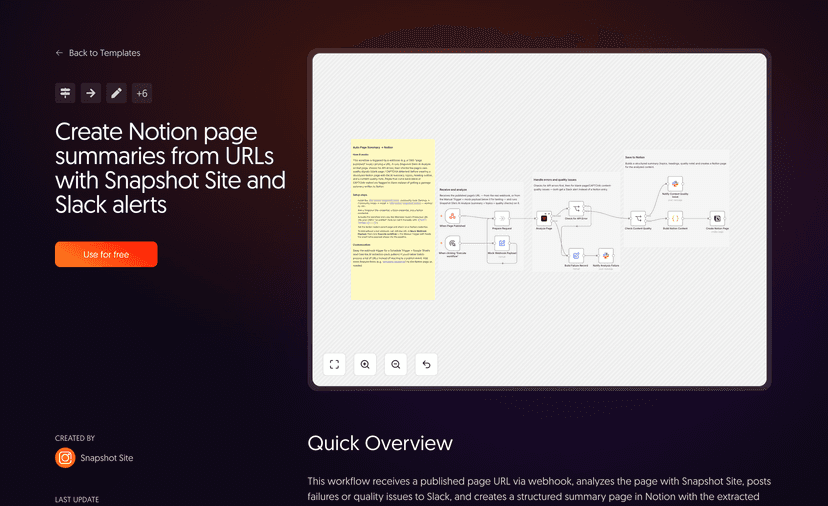
The "Auto page-summary → Notion/CMS" workflow in the Snapshot Site n8n gallery removes that manual step entirely. It is the first workflow in the collection to combine the Analyze operation with the Notion node, and the result is a running archive that builds itself: every entry backed by a real screenshot, an AI summary, and a set of extracted topics, written straight into a Notion database.
How the Workflow Is Built
The shape of it is simple, which is part of the appeal:
- A trigger feeds in a URL. This can be a schedule that checks a fixed list of pages, an RSS item from a blog or changelog feed, or a manually maintained list of URLs sitting in a spreadsheet or database node.
- A Snapshot Site node captures and analyzes the page. With AI summary enabled, the
analyzeoperation returns the screenshot itself along with asummarystring and a list oftopicsdescribing what the page is actually about. - A Notion node writes the result. It creates a new page or database row using the title, the summary, the topics, and a link to the screenshot image — no manual copy-pasting required.
That is the entire loop. Add a URL, and a fully-formed archive entry shows up in Notion a few seconds later.
Why the Screenshot Matters as Much as the Summary
It would be easy to build this same workflow with a text-scraping node instead of a screenshot API, and skip straight to summarizing raw HTML. The problem is that scraped text is hard to verify later. Six months from now, when someone questions whether a competitor's pricing page really said what the summary claims, there is nothing to point to except the AI's word.
Backing every summary with an actual screenshot solves that. The image captured at analysis time is the page as it rendered, at that moment, for that visitor. If a summary looks off, or a topic tag seems wrong, anyone can open the screenshot and check it directly. That single detail turns a list of AI-generated notes into something closer to a citable record.
The analyze operation also exposes quality signals from the same call — isBlank and hasCaptcha are the two worth wiring into the workflow. A blocked or empty capture is a bad archive entry no matter how confident the summary text sounds, so checking these flags before the Notion node runs keeps junk out of the database rather than cleaning it up later.
Who This Is For
This pattern shows up most naturally in a few settings:
- Content teams tracking what competitors and adjacent publications are shipping, without assigning someone to read everything manually.
- Market and competitive research groups that need a lightweight, always-on watch over a set of pages, rather than a one-off audit.
- Curated internal reading lists — onboarding docs, vendor pages, or reference material that a team wants summarized and searchable in Notion instead of scattered across bookmarks.
In each case, the value is the same: a knowledge base that grows on its own, entry by entry, instead of depending on someone remembering to write it up.
The One Setup Step People Miss
The most common first-run snag with this workflow has nothing to do with Snapshot Site — it is a Notion permissions issue. The Notion node can only write to a page or database that has been explicitly shared with your Notion integration. If the workflow runs but nothing shows up, or you get a permissions error on the Notion step, check that the target page or database has been shared with the integration connected to n8n. It is a one-time fix, but it catches nearly everyone the first time they wire this up.
If you are maintaining any kind of running archive — competitor tracking, documentation snapshots, or a shared reading list — this workflow is a good template to start from. Snapshot Site provides the analyze operation that powers it, turning any URL into a screenshot, a summary, and a set of topics in a single call.